

Pada artikel sebelumnya, kita sudah membahas mengenai OCR (Optical Character Recognition) sederhana menggunakan python. Di artikel ini, kita akan sedikit mencoba melakukan deteksi dan localization pada suatu gambar yang berisi teks menggunakan Tesseract OCR. Jika kamu tidak tahu, Tesseract adalah mesin OCR untuk berbagai sistem operasi. Saat ini Tesseract bisa digunakan di platform Windows, macOS, dan Linux.
Jika kamu tidak familiar dengan menggunakan Tesseract, kamu bisa membaca artikel saya sebelumnya mengenai Tesseract OCR. Artikel tersebut berisi tentang cara melakukan instalasi dan tata cara penggunaan dari Tesseract OCR.
Membuat Optical Character Recognition (OCR) Sederhana menggunakan Python
Mari kita mulai. Pertama-tama kita akan memasukkan dependensi yang kita butuhkan. Disisi kita membutuhkan library Pytesseract dan OpenCV. Jika kamu belum menginstal OpenCV di komputer kamu, silakan kunjungi halaman ini.
from pytesseract import Output
import pytesseract
import cv
Saya akan menggunakan gambar sederhana untuk menguji penggunaan Tesseract. Saya akan menggunakan gambar di bawah ini. Kamu bebas memilih gambar yang akan kamu gunakan, usahakan bahwa tulisan pada gambar tersebut cukup jelas dan terbebas dari noise.
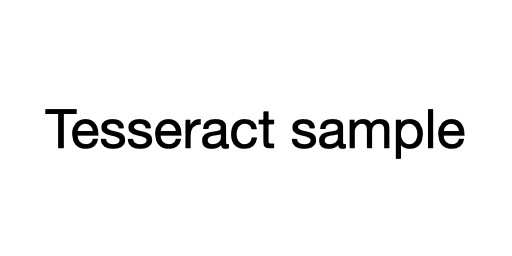
Mari kita ekstrak data gambar tersebut.
filename = '/content/example_01.png'
image = cv2.imread(filename)
Berbeda dengan yang kita lakukan pada artikel sebelumnya, dimana pada artikel sebelumnya kita langsung merubah gambar menjadi string. Pada artikel ini, kita akan mengubah gambar menjadi dictionary.
results = pytesseract.image_to_data(image, output_type=Output.DICT)Berikut merupakan isi dari dictionary tersebut.
{
  'level': [1, 2, 3, 4, 5, 5, 5],
  'page_num': [1, 1, 1, 1, 1, 1, 1],
  'block_num': [0, 1, 1, 1, 1, 1, 1],
  'par_num': [0, 0, 1, 1, 1, 1, 1],
  'line_num': [0, 0, 0, 1, 1, 1, 1],
  'word_num': [0, 0, 0, 0, 1, 2, 3],
  'left': [0, 26, 26, 26, 26, 110, 216],
  'top': [0, 63, 63, 63, 63, 63, 63],
  'width': [300, 249, 249, 249, 77, 100, 59],
  'height': [150, 25, 25, 25, 25, 19, 19],
  'conf': ['-1', '-1', '-1', '-1', 97, 96, 96],
  'text': ['', '', '', '', 'Testing', 'Tesseract', 'OCR']
}
Saya tidak akan menjelaskan satu persatu maksud setiap isi dalam dictionary tersebut. Di sini kita akan menggunakan nilai left, top, width, dan height untuk menggambar bounding box di sekitar teks bersama dengan teks itu sendiri. Selain itu, kita membutuhkan nilai conf untuk menentukan boundary teks yang terdeteksi.
Sekarang kita akan mengekstrak koordinat bounding box dari wilayah teks dari hasil saat ini.
for i in range(0, len(results["text"])):
  x = results["left"][i]
  y = results["top"][i]
  w = results["width"][i]
  h = results["height"][i]

  text = results["text"][i]
  conf = int(results["conf"][i])
Terakhir kita tentukan nilai confidence yang kita inginkan, disini saya akan menggunakan nilai conf = 70. Jadi kodenya akan seperti ini.
if conf > 70:
    text = "".join([c if ord(c) < 128 else "" for c in text]).strip()
    cv2.rectangle(image, (x, y), (x + w, y + h), (0, 255, 0), 2)
    cv2.putText(image, text, (x, y - 10), cv2.FONT_HERSHEY_SIMPLEX,
        0.5, (0, 0, 200), 2)
Sekarang semuanya sudah diatur. Kemudian kita tampilkan hasilnya dengan menggunakan kode berikut.
cv2.imshow(image)Dan inilah hasilnya.

Dari hasil di atas dapat diketahui bahwa hasil yang diperoleh cukup baik. Ada beberapa parameter yang bisa kamu ubah, seperti batas nilai confidence, atau jika kamu merasa tampilannya kurang menarik, kamu bisa mengubah ketebalan atau warna bounding box ataupun teks berwarna merah pada gambar tersebut.